
Print-on-demand sounds simple because it removes a lot of production responsibility. Web-to-print sounds more involved because it gives the business more control.
That difference matters when you are selling custom products, not just uploading a design to a marketplace. A creator selling one shirt design may need a different setup than a print shop taking custom artwork, proofing orders, routing jobs, and managing fulfillment partners.
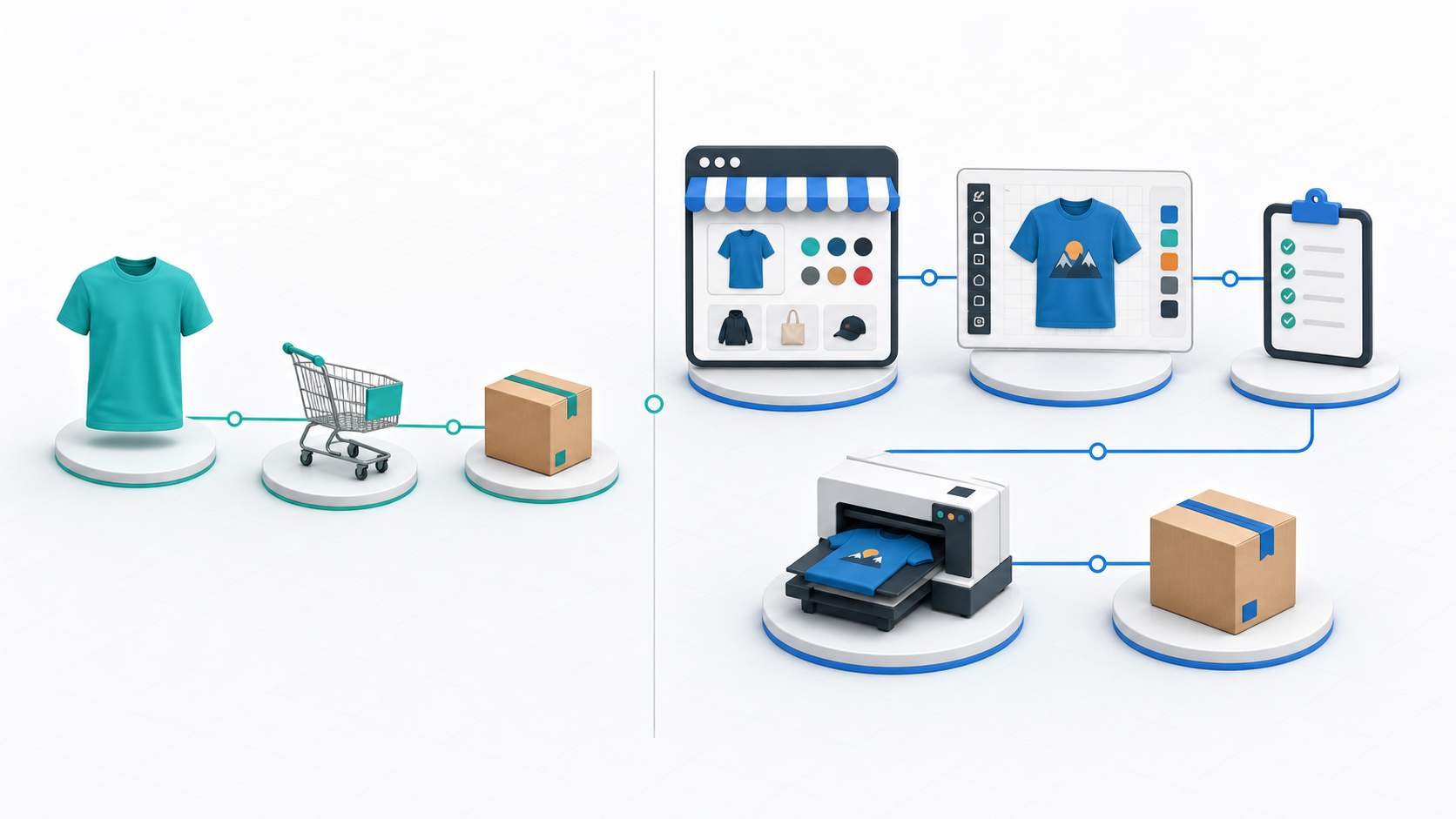
1. Print-on-Demand Is Usually Built for Simpler Product Sales
Print-on-demand works well when the business wants to sell products without managing production directly. A seller uploads artwork, chooses products, and lets the platform or fulfillment provider print and ship when an order comes in.
That can be a good fit for simple merch drops, creator products, or early testing. The tradeoff is control. The storefront, checkout experience, product setup, customer data, and fulfillment rules often live inside someone else’s system.
If the product does not need much customization, that may be fine. If customers need to add names, upload logos, approve proofs, pick production options, or submit detailed instructions, print-on-demand can start to feel limited.
2. Web-to-Print Is Built Around the Custom Order Workflow
Web-to-print is not only about putting a design tool on a product page. A useful web-to-print setup connects the customer design experience to the way the order moves through the business.
That means the order should carry the artwork, product color, size choices, design placement, customer notes, and production details forward after checkout. A print shop should not have to rebuild the order from screenshots and email threads.
This is where web-to-print becomes more useful for custom apparel, signs, promotional products, church merch, nonprofit campaigns, and fulfillment businesses that need order control.
3. The Main Question Is How Much Control You Need
If you want speed and simplicity, print-on-demand may be enough. If you want ownership of the storefront, more control over the buying experience, and a clearer path from customization to fulfillment, web-to-print is usually the stronger model.
For example, a WooCommerce store can keep customers on the business’s own website while still supporting product customization. That helps with brand control, SEO, content, checkout, and customer relationship building.
The operational side matters too. A team may need to review artwork, assign embroidery or DTF work, route a job to a vendor, or track a fulfillment status. Those are workflow needs, not just product listing needs.
4. Web-to-Print Fits Businesses That Handle Variation
Custom product businesses often deal with variation: shirt colors, size runs, print locations, design areas, production methods, add-ons, and customer-specific instructions.
When those details are handled manually, every order creates extra work. Someone has to check what the customer chose, confirm the artwork, prepare the proof, and make sure production understands the job.
A connected web-to-print workflow helps collect those details earlier and keep them attached to the order. That does not remove every review step, but it gives the team better information to work from.
5. Where Impact Designer Fits
Impact Designer is built for businesses that want more than a basic product customizer or a closed print-on-demand storefront.
It brings product customization, storefront control, order management, vendor and team access, and fulfillment workflows into one connected web-to-print platform built for WordPress.
That makes it a better fit for print shops, merch brands, churches, nonprofits, agencies, and fulfillment teams that need to design, sell, and manage custom products with more control.
If your business only needs to sell a few fixed designs, print-on-demand may be enough. If custom orders create artwork review, proofing, vendor routing, production notes, and fulfillment handoff, web-to-print gives you a stronger foundation.
FAQ
Is web-to-print the same as print-on-demand?
No. Print-on-demand usually focuses on producing and shipping products after each sale. Web-to-print focuses on the broader custom product workflow, including online customization, storefront control, order details, production review, and fulfillment handoff.
Can a business use both models?
Yes. Some businesses use print-on-demand for simple products and web-to-print for custom ordering. The right choice depends on how much control, customization, and workflow structure the business needs.
Ready to build a better custom product workflow? Impact Designer gives you the tools to design, sell, and manage custom products from one connected web-to-print platform. Get access or book a demo to see how it can fit your business.