
To create decorated products by uploading designs:
1. Open Impact Designer Admin.
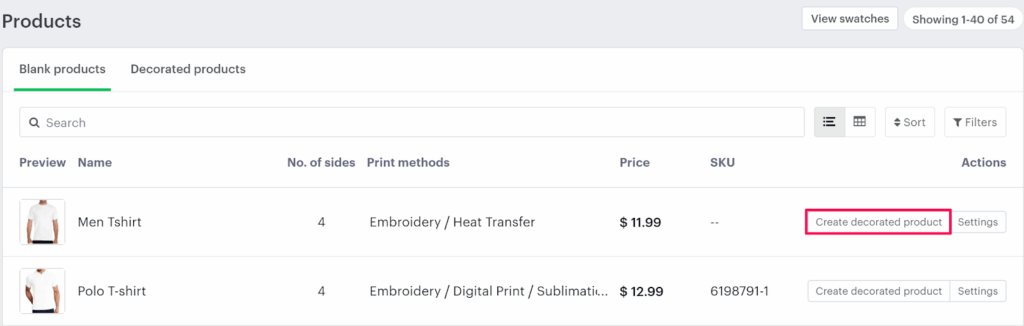
2. Click “Products” in the navigation panel.

3. On the Products page, click “Create Decorated Product” under the Actions panel.
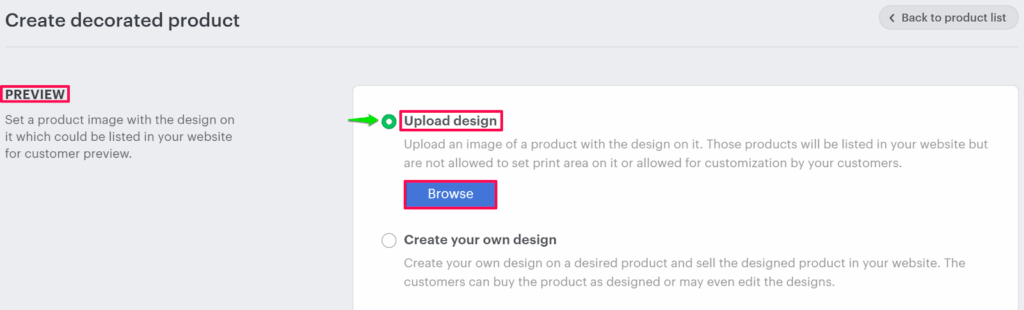
4. On the Create Decorated Product page, go to the Preview section and select the Upload Design option.
5. Click “Browse” to upload your design file.
6. After uploading your design, scroll down and fill in the product details such as Name, Price, Stock, SKU, etc.
7. Assign the appropriate category and product attributes.
8. Click “Create” to save your product.
You’ve successfully created a decorated product by uploading your own design!
► Once saved, the decorated product will automatically be added to your e-commerce store with all the provided product information, making it available for your customers to purchase.