
This feature is ideal for stationery products such as business cards, flyers, brochures, and similar items. It allows you to set a minimum order quantity and define incremental quantity steps.
In the Designer Studio, customers will see the minimum quantity displayed, and any quantity increases will follow the increment values you define.
Steps to Configure Minimum and Incremental Value
1. Open Impact Designer Admin.
2. Click “Products” in the navigation panel.

3. On the Products page, click “Settings” under the Actions column.
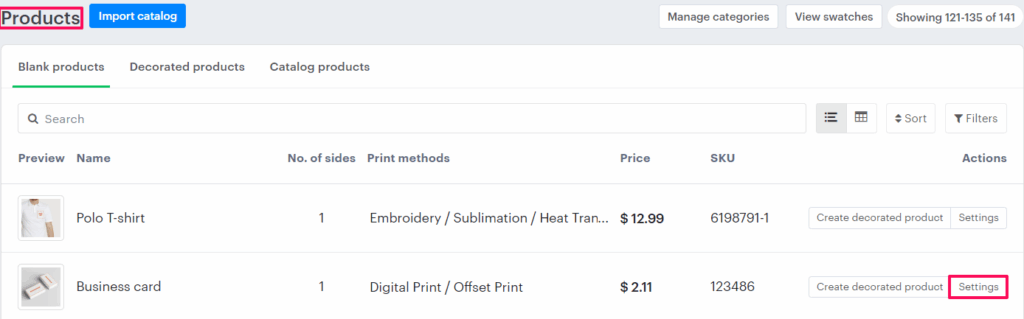
4. Scroll down to find the Imprint Area section.
• Enable the checkbox labeled Set Minimum Quantity with Increment Setup.
• Enter the minimum quantity and define the incremental quantity value.
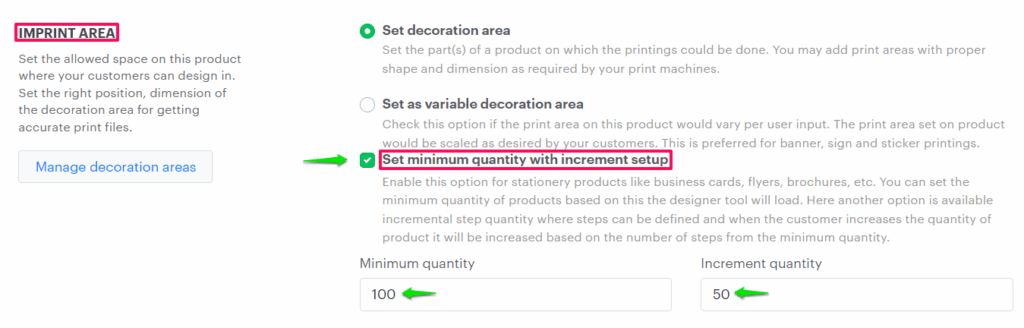
► Minimum quantity is set for loading the designer tool with the given value. In increment quantity, steps can be defined, and when the customer increases the quantity of the product, it will be increased based on the number of steps from the minimum quantity.
5. Scroll down and click “Save Decoration Area” to apply your changes.
You’ve successfully configured the minimum and incremental values for your product!