
Configure price for premium cliparts; the price will be added to the total printing cost based on the number of cliparts used and quantity ordered.
Steps to Enable Quantity Tier
1. Open Impact Designer Admin.
2. Click “Print Profile” in the navigation panel.

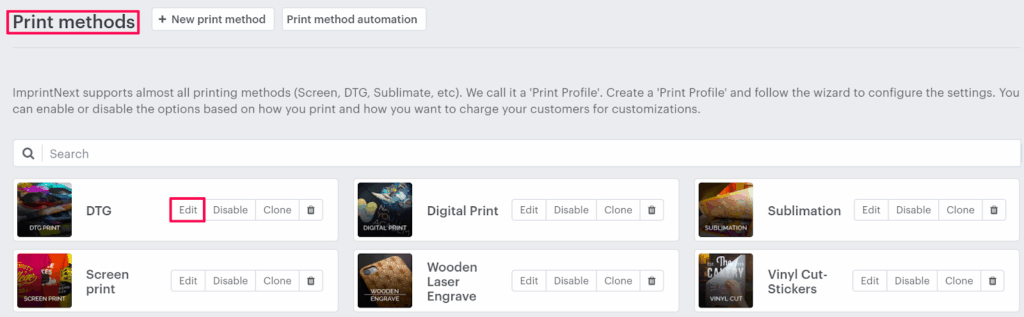
3. In the Print methods page, select your print method and click “Edit”
4. Select the Price Setting tab.

5. Click “Add Print Pricing”

6. A pop-up named Select pricing appears. Scroll down to select the Clipart checkbox and click “Apply.”

7. Under Additional price setup, select the Convert to quantity tier checkbox, and a quantity tier table will open below. Now take the following actions:
- To configure the price for a larger print area, click “Add print area”
- To add more order ranges, click “Add tier”
8. Set the percentage value for different quantity ranges of the clipart.
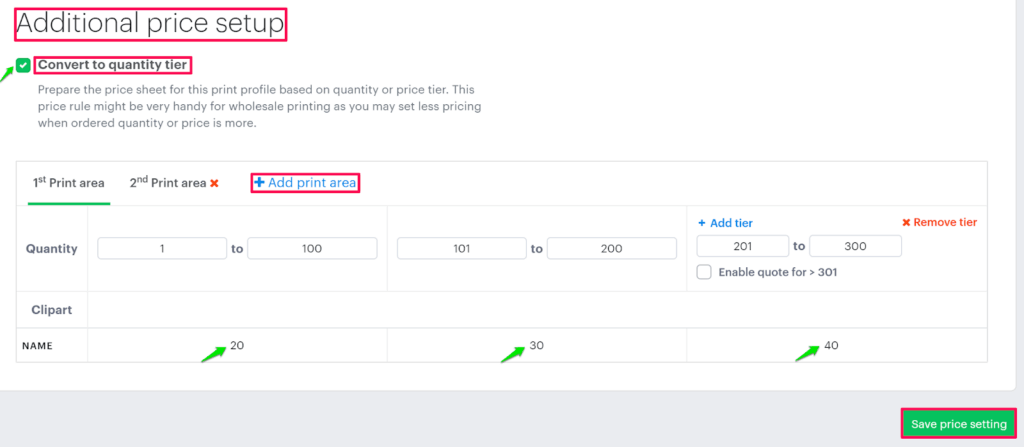
► The value for the clipart quantity range is to be set in percentage (%).
9. Click “Save price setting”
You have successfully enabled Quantity Tier for Clipart Price!
Example:
How will the tool calculate the cost based on the price configuration?
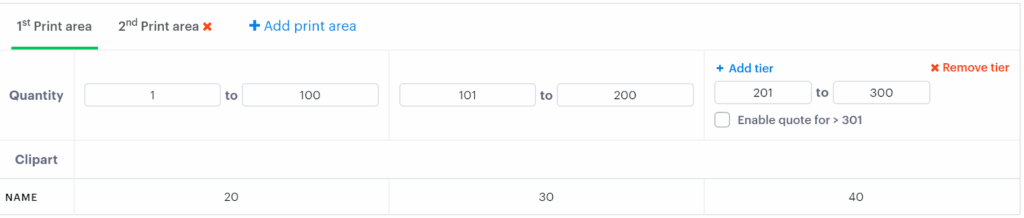
Order Range = 1- 300
Total print area = 2
Hypothetical Question 1:
For an order placed for 60 T-shirts priced at $13 each, with one side customized. On the first side of the product, two cliparts are added. So, what will be the final price of the product?
Answer:
Order Quantity = 60
Number of customized sides = 1
Total number of cliparts added = 2
Price of first clipart = $5.00
Price of second clipart = $2.50
Clipart Price = Price of first clipart + Price of second clipart
= $5 + $2.50
= $7.50
As the clipart is added on the first side so the calculation will be done from the 1st Print area tab.
Then, the quantity of products is 60, so it will take the price from the quantity range 1-100. i.e., 20%
Now, the percentage that we get from the quantity range will be calculated over the clipart price.
Then, Quantity Tier Price = (Clipart Price) – (20% x Clipart Price)
=$7.50 – (20% x $7.50)
= $7.50 – $1.50
= $6
Now, Decoration price = Clipart Price x Order Quantity
= $6 x 60
= $360
The price will be shown to the customer:
Product Price + Decoration Price
= ($13 x Order Quantity) + $360
= ($13 x 60) + $360
= $780 + $360
= $1140
So, the final price of the product will be $1140
Hypothetical Question 2:
For an order placed for 220 T-shirts priced at $13 each, with both sides of the product customized. On the first side, two cliparts are added, and on the second side, another two cliparts are added. So what will be the final price of the product?
Answer:
Order Quantity = 220
Number of customized sides =2
Total number of clipart added = 4
Price of first clipart = $5.00
Price of second clipart = $4.00
Price of third clipart = $3.50
Price of fourth clipart = $2.50
► For the clipart added on the first side, the calculation will be done from the tab 1st Print area, and for the clipart added on the second side, the calculation will be from the tab 2nd Print area.
Calculation for 1st Print Area
First, we will calculate the price of the clipart, which is added to the first side
Clipart Price for first side = Price of first clipart + Price of second clipart
= $5 + $4
= $9
As the clipart is added on the first side, it will take the price from the 1st Print area tab.
Then, the quantity of product is 220. So it will take the percentage value from the quantity range 201-300. i.e., 40%
Now, the percentage value that we get from the quantity range will be calculated over the clipart price.
Quantity Tier Price for 1st Print area
= (Clipart Price for first side) – (40% x Clipart Price for first side)
=$9 – (40% x $9)
= $9 – $3.6
= $5.4
Calculation for 2nd Print area
Clipart Price for second side = Price of third clipart + Price of fourth clipart
= $3.50 + $2.50
= $6
As the clipart is added on the second side, it will take the price from the 2nd Print area tab.
Then, the quantity of product is 220. So it will take the percentage value from the quantity range 201-300. i.e., 45%
Now, the percentage that we get from the quantity range will be calculated over the clipart price.
Quantity Tier Price for 2nd print area
= (Clipart Price for second side) – (45% x Clipart Price for second side)
= $6 – (45% x $6)
= $6 – $2.7
= $3.3
Now, we will add both the Quantity Tier Price, which we get from the 1st Print area, and the 2nd Print area
So, Quantity Tier Price = 1st Print Area + 2nd Print area
= $5.4 + $3.3
=$8.7
Decoration price = Quantity Tier Price x Order Quantity
= $8.7 x 220
= $1914
The price will be shown to the customer:
Product Price + Decoration Price
= ($13 x Order Quantity) + $1914
= ($13 x 220) + $1914
= $2860 + $1914
= $4774
So, the final price of the product will be $4774