
To assign imprint areas with different printing methods:
1. Open Impact Designer Admin.
2. Click “Products” in the navigation panel.

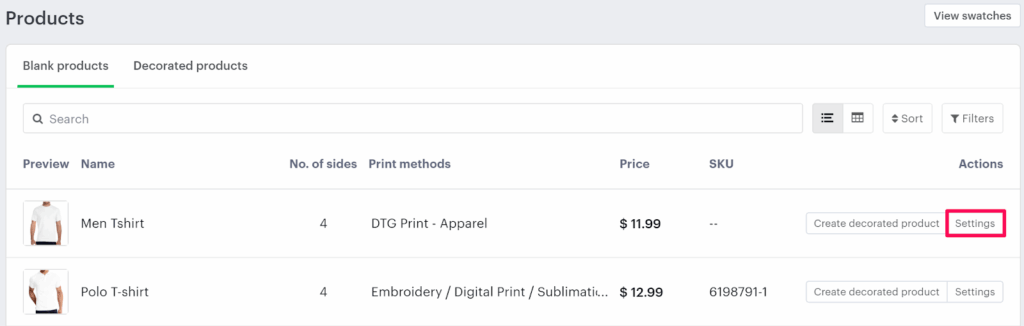
3. On the Products page, click “Settings” under the Actions column.
4. The Decoration Area Settings page will open.
• Scroll down to the bottom and locate Assign Imprint Method.
5. Assign the appropriate imprint methods to each of the imprint areas as needed.
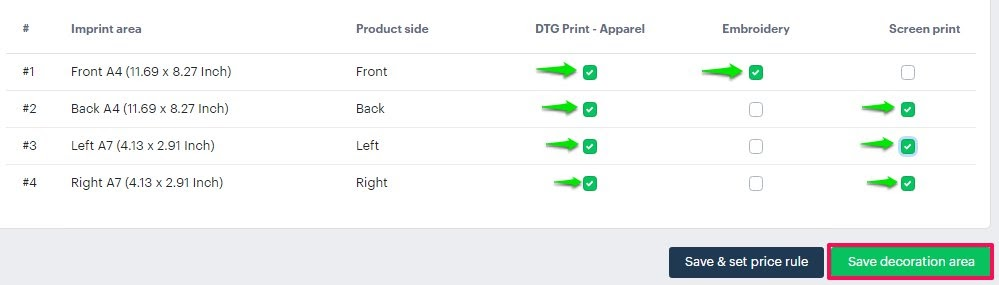
6. Click “Save Decoration Area” to save your changes.
You’ve successfully assigned imprint areas with different printing methods!
► Configure the imprint method and imprint area before saving the assigned imprint method.